PassMark USB2.0 Loop back plug FAQ
Which operating systems are these plugs compatible with?
- The drivers are currently only available for Windows Vista, Windows 7, 10, 11 and 2008 Server (in 32bit and 64bit).
- Linux with kernel releases 2.6.9 or higher are supported, when used with BurnInTest for Linux v2 (or later). LibUSB is also required. (This is standard Linux library supplied with almost all Linux distributions).
Do I need a device driver to use these plugs?
- A device driver is required for Windows. It is available for download here. Windows will prompt for the device driver the first time a plug is used. The installation process is covered in the install guide. No special device driver is required for Linux.
Are the device drivers compatable with all versions of BurnInTest and USB2Test?
- The latest versions of BurnInTest and USB2Test work with any version of the USB 2.0 Loopback plug device driver, however it is recommended that the latest version be used. BurnInTest V6.0 (and earlier) and USB2Test V1.1.1008 (and earlier) require Version 6.1 (or earlier) of the USB 2.0 Loobpack device driver.
I noticed that the model number of the USB 2.0 Loopback plug has changed from "PMUSB02" to "PMUSB02 (rev2)". What is the difference?
- PMUSB02 (rev2) is a new hardware revision, available from Feb 2007, that improves the enumeration (connection) process and complies with the EU environmental RoHS directive (restricting certain metals, such as lead and flame retardants). The Rev 2 hardware also has lower power requirements.
- All versions of the PassMark USB 2.0 Loopback plug device drivers, USB2Test software and BurnInTest v4.0 (and higher) software are compatible with both hardware revisions. Here is a summary of the differences between rev 1 and rev 2.
-
Feature PMUSB02 (rev1) PMUSB02 (rev2) RoHS compliant. No Yes 
Current
(Theoretical Max)400mA 250mA Current
(Typical operation)240mA 60mA Enumeration process (plugging the device in) Device starts as a low power HID device and based on the type of USB port changes to a PassMark USB 2.0 Loopback plug. Enumeration is simpler and quicker. Device draws less current on enumeration and starts as a PassMark USB 2.0 Loopback plug. Firmware version 2 3 - There was also a hardware revision 2.1. This was a very minor change. Mid 2017 our supplier discontinued the colored LEDs we were using, so new LEDs of a slightly different style & size were sourced as a replacement.
The USB2Test software shows that the firmware version has changed from V2 to V3 for new USB 2.0 Loopback Hardware. Should I update the firmware of my older plugs to V3?
- No. V1 or V2 of the firmware is required for the PassMark USB 2.0 Loopback plug model "PMUSB02". V3 of the firmware is required for the PassMark USB 2.0 Loopback plug model "PMUSB02 (rev2)" and utilizes new hardware features not available with the earlier revision of hardware.
After reboots or S4 sleeps some USB 2.0 loopback plugs do not work when more than 2 plugs are connected to the system. The error show in device manager is Error 10, USB Human Interface device?
- This is a known issue with the Intel Ibex Peak chipset with Windows XP and the older revision 1 USB 2.0 Loopback hardware. We recommend using the updated revision 2 of the USB 2.0 Loopback plug, which works with chipset.
Why does BurnInTest have a limit of only 10 plugs in use at the same time?
- BurnInTest Pro v7.0 with USB 2.0 Loopback device driver V7.0 supports testing up to 25 USB ports with USB 2.0 Loobpack plugs.
Does the PassMark USB 2 loop back plug appear in my Device Manager as a new USB Device?
- Yes, you can see the devices in the Windows device manager. They appear with the label, "USB2 Driver (PMUSB.sys)".
Can the plugs also be used on PCs with older USB1.1 ports?
- Yes, but they will not use the additional bandwidth available in 2.0.
What is the meaning of the 5 LEDs on the device
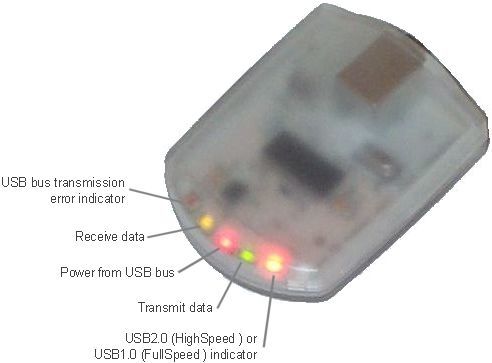
Can the USB2 plugs be used to test bus powered USB hubs?
- In most cases bus powered USB hubs will draw too much electrical power from the PC's USB ports to support additional USB2 devices being connected into the hub. We recommend using self powered USB hubs when required (self powered hubs come with their own power supply).
I get a error message "This device cannot start (code 10)" what does this mean?
- If a PC's USB port has insufficient power to start the USB2Test device in High-Speed mode you will receive a HID device driver error message "This device cannot start (code 10)". Disconnect other devices from the same USB root hub to make more power available for the device. This will typically occur when a USB2 test device is plugged into a bus-powered hub or a laptop running from battery power. Switch over to a self-powered hub or connect the laptop to a mains power supply.
What Windows patches do I need to correctly support USB2 on my PC
- There are a large number of problems found by Microsoft with different configurations of operating systems and the USB2 Host Controllers found on various PC motherboards. It is important to ensure that you have the latest device drivers contained in the latest Microsoft Service Packs and the latest O/S patches.
The benchmark speed reduces as I add USB devices, why?
- As you add USB devices to the (Universal Serial) Bus you will observe a reduction in maximum performance of each USB device. This is to be expected and is due to increasing overheads on the bus as more devices are added. The overheads introduced from each USB device on the bus reduces the number of bytes that can be utilized by other USB devices during a frame (i.e.. less data blocks can be transferred per frame ). Overheads include packet organization, framing information, polling, clock adjustment and reserved time.
What type of USB data transfer type does the USB 2.0 loopback plug use?
- Bulk USB transfers are used. Bulk transfers guarantee accuracy of the data through detection of erroneous data and automatic retries.
The red Error LED goes on. What does this mean?
-
It means the USB 2.0 loopback plug has flagged a Device transceiver error. Device transceiver errors are triggered when the USB transceiver on the USB 2.0 loopback plug detects what it considers to be an error. These are events at a low level that may lead to the packet being retransmitted. They do not represent data errors at the application level. These errors are normally not visible to the user, but are displayed to help identify potential problems, for example, poor quality cables, cables that are too long, or system internals with insufficient electrical shielding with high electrical interference on the bus. Errors that may cause a device transceiver error are:
- Bad PID
- CRC error
- Bit stuff error
- Extra bits in a packet
- Full Speed EOP ending on K
- Loss of high-speed valid before EOP (truncated packet)
- Overflow (host clock running too fast or device clock running too slow)
- Token larger than 3 bytes (this may occur when using the USB 2.0 Loopback plug behind a hub, with Low/Full speed devices connected to the hub).
What maximum speed should I expect from my USB port?
-
USB2.0 High-speed is normally quoted as 480Mb/Sec. USB2.0 and USB1.x Full-speed is normally quoted as 12Mb/Sec. Data rates will never reach these speeds on a real device because some signaling bandwidth is used by packet organization, framing information, polling, clock adjustment and reserved time. On a correctly functioning PC with a single USB device connected, you should typically see measured maximum speed results in the order of approximately:
- High Speed USB2.0 ports connected to the motherboard: 300Mb/Sec.
- High Speed USB2.0 ports connected to a typical PCI card: 150Mb/Sec.
- Full Speed USB2.0 or USB1.x ports connected to the motherboard: 8Mb/Sec.
- Full Speed USB2.0 or USB1.x ports connected to a to a typical PCI card: 6Mb/Sec.
The more USB devices connected to the PC the slower the maximum speed of each of the USB ports.
Is there an Application Programming Interface available?
- Yes there is an API available, see this page for more information.
The USB 2.0 Loopback Plug driver V7.1.1000 is compatible with Windows Memory Integrity (a feature of Core Isolation)
-
Core Isolation provides added protection against malware and other attacks by isolating computer processes from your operating system and device. Memory Integrity is a feature of core isolation. By turning on the Memory Integrity setting, you can help prevent malicious code from accessing high-security processes in the event of an attack.
Prior to V7.1.1000 of the USB 2.0 Loopback Plug driver it was necessary to disable Core Isolation and the Memory Integrity feature in Windows 10 and onwards.
V7.1.1000 is compatible with these new features but it is for systems running 64 bit versions of Windows 10 build 16299 and onwards.